

Overview
The Support Access feature of Backuply allows you to grant temporary, time-limited server access to the Backuply support team for faster troubleshooting and issue resolution.
This option is available since Backuply v1.2.2
No server password. No SSH keys. No permanent access.
Everything is temporary and fully under your control.
Why Support Access?
Some issues cannot be resolved using logs alone. Support Access lets Backuply engineers safely inspect your server environment to:
- Diagnose backup or restore failures
- Verify permissions and services
- Debug configuration or environment issues
- Apply fixes quickly and securely
How it works ?
- You enable Support Access and choose a duration in hours
- If no duration is specified, access is granted for 7 days by default
- Backuply creates a randomly named temporary sudo user
- Support connects using only your server IP address
- No root password or SSH keys are shared
- The temporary user is removed automatically after expiry or you can remove it manually
Procedure
- Open the Support Access section in Backuply
- Enter the number of hours you want to allow access or leave the field empty to allow access for 7 days
- Click on Grant Access
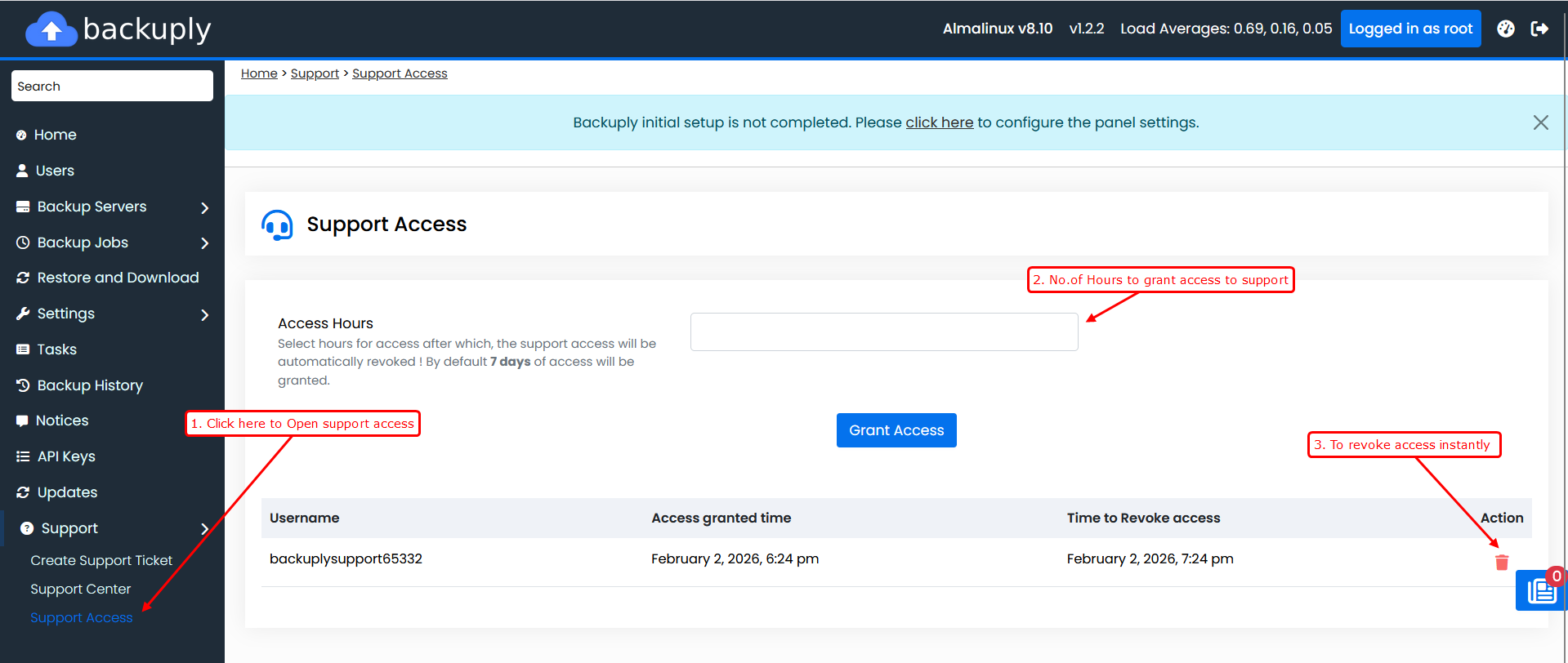
Support access becomes active immediately after saving.
Manual Revocation
If you do not revoke access manually, Backuply will automatically:
- Expire access after the selected duration
- Delete the temporary sudo user
- Ensure no background access remains
Manual revocation is instant and does not require waiting for the expiry time.